July 14, 2026
Managing a growing portfolio, finding the right data layer among thousands, or staying compliant in a specific market, these are the everyday challenges you've been telling us about, and they're exactly what this month's updates target. Whether it's running sensitivities across your whole portfolio or curtailing correctly under Germany's rules, we've built this round of features around the situations you actually run into.
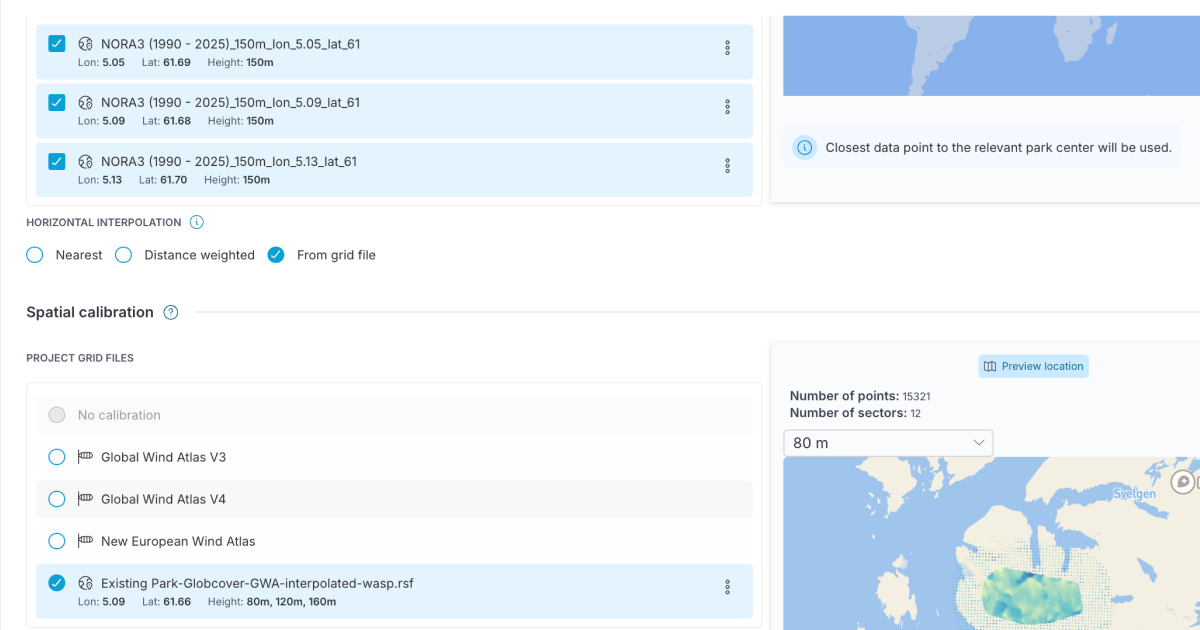
New in Configurations: Combine multiple timeseries with spatial calibration
Wind configurations now support combining multiple timeseries with spatial calibration from a grid file, such as WAsP, rather than relying on a single timeseries per grid. This gives you a more reliable picture of the wind resource on larger or more variable sites, where one reference point alone can skew results significantly.
GIS layers: A search function that understands you
Searching for GIS layers is now smarter: a query like "wind farm restrictions" can surface cable routes, protected zones, bathymetry, and shipping lanes, not just layers with those exact words in the name. With over 8,000 layers to search through, this makes it much easier to find what you need, even when you don't know its exact name.
.png)
Comply with Germany's speed and direction restrictions
In Germany, curtailments can't depend on wind speed or direction, only on time of day or night. You can now switch off wind speed and direction bins in the curtailment optimiser, making it straightforward to stay compliant with local requirements.
Offset sunrise and sunset curtailment independently
You can now offset sunset and sunrise curtailment separately, down to the minute, rather than applying the same offset to both. This is especially useful for bat curtailment schedules, which vary by region, letting your timing match the real behaviour at your site.
Onshore cabling: Control cable branching along roads
When routing onshore inter-array cables along roads, you can now choose whether to permit chain branching, letting a turbine act as a hub for multiple cables, or switch it off for a simpler layout. Use it to fine-tune your cable topology to match your project's needs.
.png)
Model sensitivities across your whole portfolio
You can now create and run sensitivities directly on the numbers page, shared across your organisation so your whole team works from the same assumptions. It's a feature many of you have been asking for as portfolios grow larger and more complex.
Build views that work the way you do
The portfolio numbers table now supports Shared and Personal views, custom columns, and drag-and-drop column ordering. Build a view for yourself, or standardise one for your whole team.
Filter, tag, and total your numbers table
You can now filter rows in the portfolio numbers table, update park tags directly within it, and see column averages and sums at a glance. A faster way to narrow in on what matters without exporting anything.
Some portfolio features are only available for Portfolio users. If you are an existing customer, and are interested in trialing Portfolio, get in touch with your customer success representative.
Please reach out if you are interested in seeing a demo, asking a question or sharing feedback.


.png)