The scenario modelling and comparison feature has been a core part of the Vind AI platform since its inception. Testing a large number of scenarios in the early phase of project development is crucial to discovering the optimal park designs and strongest business cases. Our scenarios functionality has long supported an unlimited number of scenarios for a given wind project and integrated both technical and financial parameters, so that you can explore a range of choices across your project, from turbine design and sizing, cabling designs and more.
What’s new: Structure your scenarios
The advanced algorithms built into the Vind AI platform allow our users to create and compare many more scenarios for their projects than before, much faster. Vårgrønn, for instance, tested 36 different scenarios of only turbine layouts in a single project. That is why we have now made it easier for you to structure all your scenarios within the platform, for even smarter early-phase planning.
Plan your scenario work earlier: From the moment you first set up a new wind project in the platform, you can add all the scenarios you want to explore, eliminating the need for a separate list of scenarios to consider.
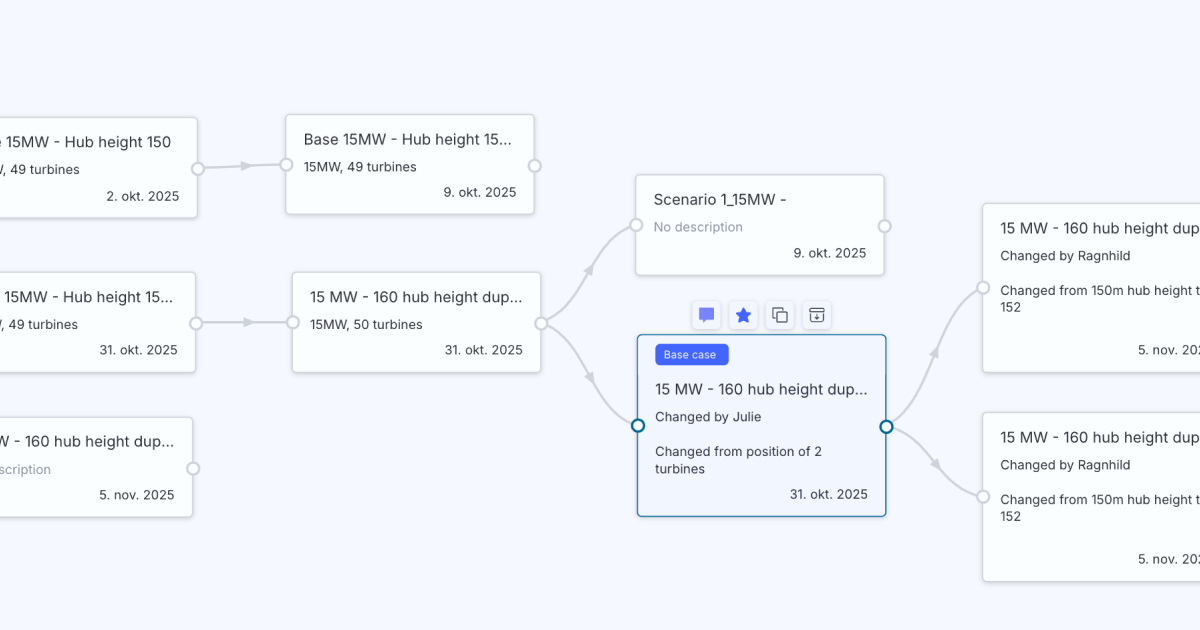
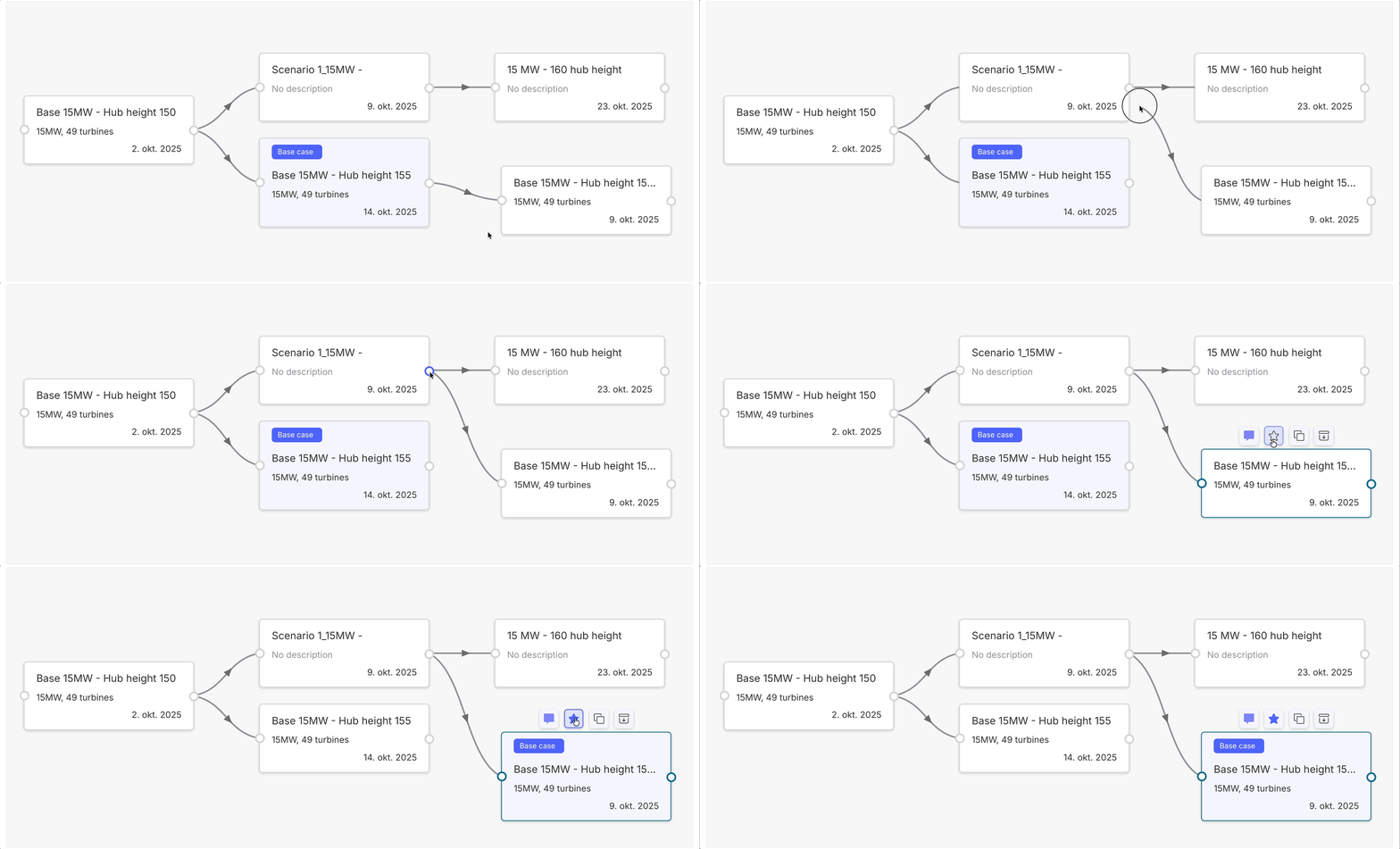
Have full control over the current base case: Developers often have many team members working in parallel in Vind AI on different scenarios, since the platform syncs their work in real-time. Now, to make it clear which version is your main project, you can now tag one branch as the ‘Base’ scenario to show which version represents the current project hypothesis, and update it as you learn and test other scenarios.
Retain a complete overview of your scenario work in the project so far: Alongside which concept the current hypothesis (base case) is, you can see which scenarios are yet to be tested, and which ones have already been tested, discarded and archived (and why). This overview of scenarios allows you to easily track project progress and coordinate next steps with the rest of the team.
Visualise how your scenarios connect: You can now show the relationships between scenarios directly in Vind AI. If one scenario is based on another, you can make that link explicit and easily see how everything fits together. For example, if you start with a turbine layout and want to explore two grid connection options and three substation placements, you no longer need long, complex names to keep track of them. Simply put your main scenario at the top and nest the related scenarios beneath it to show how they branch out.
Communicate final results clearly: Once you have established your best possible scenario, the overview of all your scenario work within Vind AI ensures your evaluation process is transparent and easy to present to decision-makers in your organisation.
Want to learn more? Dive into how to run multiple scenarios, compare them and track project progress in Vind AI here.
Run a wind resource assessment in hours, not weeks
See how Vind generates AEP with P50/P90 from your site data.
Ingvild is Head of Product at Vind AI, where she leads product strategy for the platform's wind, solar, and battery storage tools. She joined Vind AI in 2022 as a senior software developer and moved into product leadership in 2025. Before that, she worked as a data scientist and product manager, and as a machine learning practice lead. She holds a Master of Science in Optimisation from NTNU.
Credentials & experience: [e.g. MSc Wind Energy, DTU · 8 yrs in energy assessment · contributor to (industry body)]. Replace with real, verifiable credentials — naming genuine qualifications and publications is the E-E-A-T signal.
How we know this. This guide reflects assessment workflows used inside the Vind platform and the standards referenced above. Figures are typical ranges, not project guarantees.
Editorial policy. Vind articles are written by practitioners and reviewed for accuracy. Last reviewed 20 Jun 2026. Spotted an error? Tell us and we'll correct it. See our editorial & corrections policy.
One platform for wind & hybrid design
Resource assessment, layout and yield — from screening to financial close.
The scenario modelling and comparison feature has been a core part of the Vind AI platform since its inception. Testing a large number of scenarios in the early phase of project development is crucial to discovering the optimal park designs and strongest business cases. Our scenarios functionality has long supported an unlimited number of scenarios for a given wind project and integrated both technical and financial parameters, so that you can explore a range of choices across your project, from turbine design and sizing, cabling designs and more.
What’s new: Structure your scenarios
The advanced algorithms built into the Vind AI platform allow our users to create and compare many more scenarios for their projects than before, much faster. Vårgrønn, for instance, tested 36 different scenarios of only turbine layouts in a single project. That is why we have now made it easier for you to structure all your scenarios within the platform, for even smarter early-phase planning.
Plan your scenario work earlier: From the moment you first set up a new wind project in the platform, you can add all the scenarios you want to explore, eliminating the need for a separate list of scenarios to consider.
Have full control over the current base case: Developers often have many team members working in parallel in Vind AI on different scenarios, since the platform syncs their work in real-time. Now, to make it clear which version is your main project, you can now tag one branch as the ‘Base’ scenario to show which version represents the current project hypothesis, and update it as you learn and test other scenarios.
Retain a complete overview of your scenario work in the project so far: Alongside which concept the current hypothesis (base case) is, you can see which scenarios are yet to be tested, and which ones have already been tested, discarded and archived (and why). This overview of scenarios allows you to easily track project progress and coordinate next steps with the rest of the team.
Visualise how your scenarios connect: You can now show the relationships between scenarios directly in Vind AI. If one scenario is based on another, you can make that link explicit and easily see how everything fits together. For example, if you start with a turbine layout and want to explore two grid connection options and three substation placements, you no longer need long, complex names to keep track of them. Simply put your main scenario at the top and nest the related scenarios beneath it to show how they branch out.
Communicate final results clearly: Once you have established your best possible scenario, the overview of all your scenario work within Vind AI ensures your evaluation process is transparent and easy to present to decision-makers in your organisation.
Want to learn more? Dive into how to run multiple scenarios, compare them and track project progress in Vind AI here.
Did you like this article?
To get the newest product updates, case stories and news releases, sign up for our monthly newsletter.


.svg)




.png)